CSS Syntax and its Components
In this lesson, we will learn about CSS syntax and its various includes.
CSS Syntax
CSS syntax consists of three includes and they are:
- selector
- property
- value

The property and value of a selector is written within curly braces. We can apply multiple properties on a selector as shown in the image below.
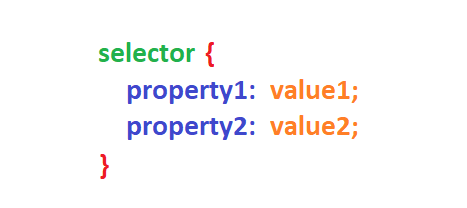
Let's explore each component in detail.
Selector
A selector targets HTML elements to apply styles. It can be an element selector, class selector, ID selector, or other advanced selectors.
For example, if you want to apply CSS on a paragraph, you can write CSS as:
p {
    font-weight: bold;
}
In the above example, p is an element selector, font-weight is a CSS property and bold is its value. We will learn more about different types of CSS selectors in the next lesson.
Property
A property defines the specific aspect of an element that you want to style. For example color, background-color, font-size, font-weight, etc.
Value
A value specifies the desired setting for a particular property. For example, a value for the color property could be red or #FF0000.
Test Your Knowledge
Attempt the questions in the exercise to check whether you have understood the lesson clearly.