Learn the Basic Structure of a C++ Program
In this lesson, we will learn about the essential includes of a C++ program and its basic structure.
Basic Structure of a C++ Program
Before we start learning how to write a program in C++, let us first understand how a basic structure of a C++ program look likes.
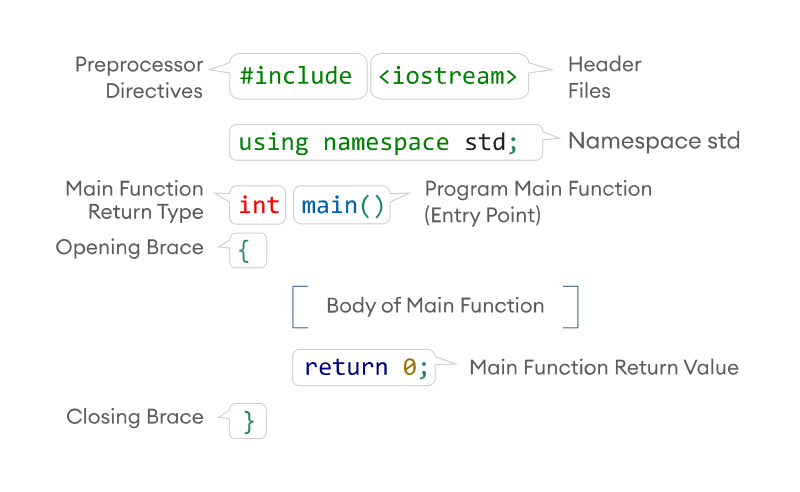

This is how a simple basic structure of a C++ program looks like.
#include <iostream>
using namespace std;

int main()
{
    // your program goes here

    return 0;
}Every C++ program must be saved in a text file with the .cpp extension, like hello.cpp, so the compiler knows it is a C++ source file.
Now we will discuss the various parts of the basic structure of a C++ program given above.
Preprocessor Directive
- A preprocessor directive begins with the # symbol.
- It is used to include necessary header files in a C++ program before the compilation starts.
Header File
- A header file contains function declarations and macro definitions for built-in library functions in C++.
- When we include a header file using #include <filename.h>, all the code inside that file is added to our program before it is compiled.
Example: #include <stdio.h> adds support for functions like printf().
namespace std
- In C++, many features like cout, cin, string, and vector are part of the standard library, which is stored in a special area called the std namespace. Normally, you have to write std::cout or std::string to use them. But if you write using namespace std; at the top of your program, you don’t need to write std:: every time. This makes your code shorter and easier to read, especially in small programs.
Program Main Function (Entry Point)
- The main() function is the starting point of every C++ program.
- It may take inputs (as parameters) and always has a return type (usually int).
- When the program runs, the operating system automatically calls the main() function.
Main Function Return Type
- According to the C++ standard, the main() function should return an int.
- This return value indicates how the program finished:
return 0; -> Program ran successfully.
Non-zero -> An error occurred.
Opening Brace {
- This marks the beginning of the main function’s body.
- All the instructions you write inside main() should be placed after the opening brace.
Body of Main Function
- This is where you write your actual C++ code.
- The compiler executes this part when the program runs.
Main Function Return Value
- The return statement at the end of main() tells the OS whether the program ended properly or not.
return 0; -> Normal completion.
return 1;, return -1;, etc. -> Errors or abnormal termination.
Closing Brace }
- This marks the end of the main function.
- No code should be written after the closing brace.
What is a Compiler
A compiler is a special program that translates your C++ code (which humans can read) into machine code (which computers can understand and execute).
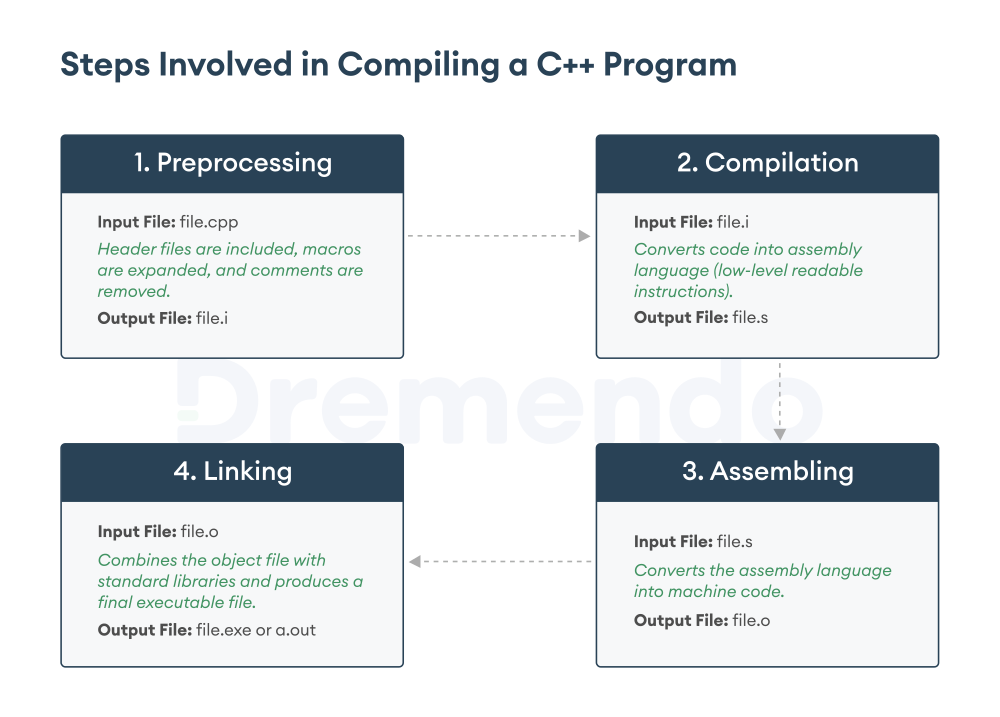
Steps Involved in Compiling a C++ Program
Compiling a C++ program is like turning your handwritten instructions into something a computer can understand and execute. When you write a C++ program and save it with a .cpp extension, the journey from source code to executable goes through four main steps and they are:
- Step 1: Preprocessing
- The first step in compiling a C++ program is preprocessing. It looks at all the lines in your source code file (like file.cpp) that start with a # symbol—such as #include and #define. During this step, header files are included, macros are expanded, and comments are removed. This process produces a temporary file that contains a clean, expanded version of your original code. The resulting file usually has a .i extension, for example, file.i.
- Step 2: Compilation
- After preprocessing, the next step is compilation. In this step, the compiler takes the preprocessed code (for example, file.i) and translates it into assembly language, which is a low-level language that is still somewhat readable by humans. The output of this step is a file with a .s extension, for example, file.s. This is an important step because it begins turning your high-level C++ code into something closer to machine instructions.
- Step 3: Assembling
- Once the assembly code is ready, the assembler takes over. The assembler converts the .s file (for example, file.s) into machine code, which is a set of binary instructions that the computer can understand directly. The result is called an object file, typically with a .o or .obj extension, for example, file.o. However, this file isn't complete yet—it can't be executed on its own.
- Step 4: Linking
- The final step is linking. During this step, the object file (for example, file.o) created earlier is combined with other object files and necessary library functions (like cin or cout) to create the final executable file. The output is a file that can be run on your computer. It has a .exe extension on Windows (for example, file.exe) or a.out on Linux.
Test Your Knowledge
Attempt the questions in the exercise to check whether you have understood the lesson clearly.